The checks at a glance
Severity is how much the check weighs in the score (high 5, medium 3, low 2, info 1). A pass earns full credit, a warning half, a failure none.
| Group | Checks | What it covers |
|---|---|---|
| Core integrity | 1 | Every core file against the official WordPress.org checksums |
| Filesystem | 3 | Executables and backups in wp-content, mu-plugins, wp-config.php writability |
| Configuration | 7 | Salts, file editor, debug display, XML-RPC, REST users, updates, table prefix |
| Access control | 7 | Admin usernames, admin count, inactive admins, user ID 1, app passwords, login protection |
| Public exposure | 5 | debug.log, readme.html, directory listing, PHP in uploads, author enumeration |
| Transport & headers | 3 | HTTPS, security headers, SSL certificate expiry |
| Vulnerability posture | 6 | Core, plugin and theme updates, known CVEs, inactive plugins and themes |
| Runtime | 1 | PHP version support |
| AI | 1 | Whether AI client reports are available |
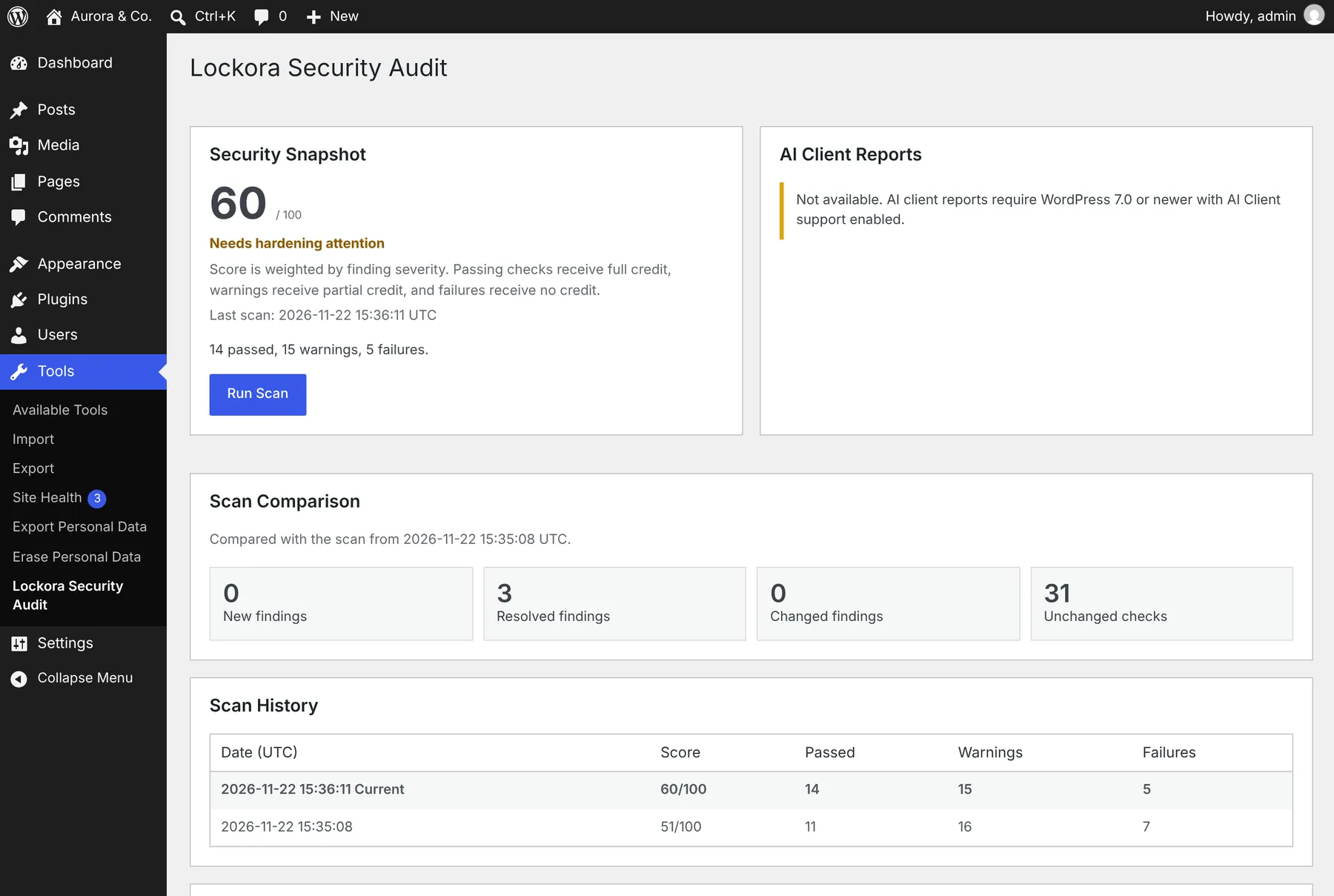
Core integrity
1 checkWordPress core file integrity high
Downloads the official checksum manifest for your exact WordPress version and locale from WordPress.org and compares every core file in wp-admin, wp-includes and the root. It reports files that are altered, missing, or extra (files in core directories that WordPress does not ship, a classic hiding place for backdoors).
Results export as CSV or TXT, and the list of unexpected files can be copied to the clipboard for your host or developer. This is the plugin-based equivalent of wp core verify-checksums, without needing shell access.
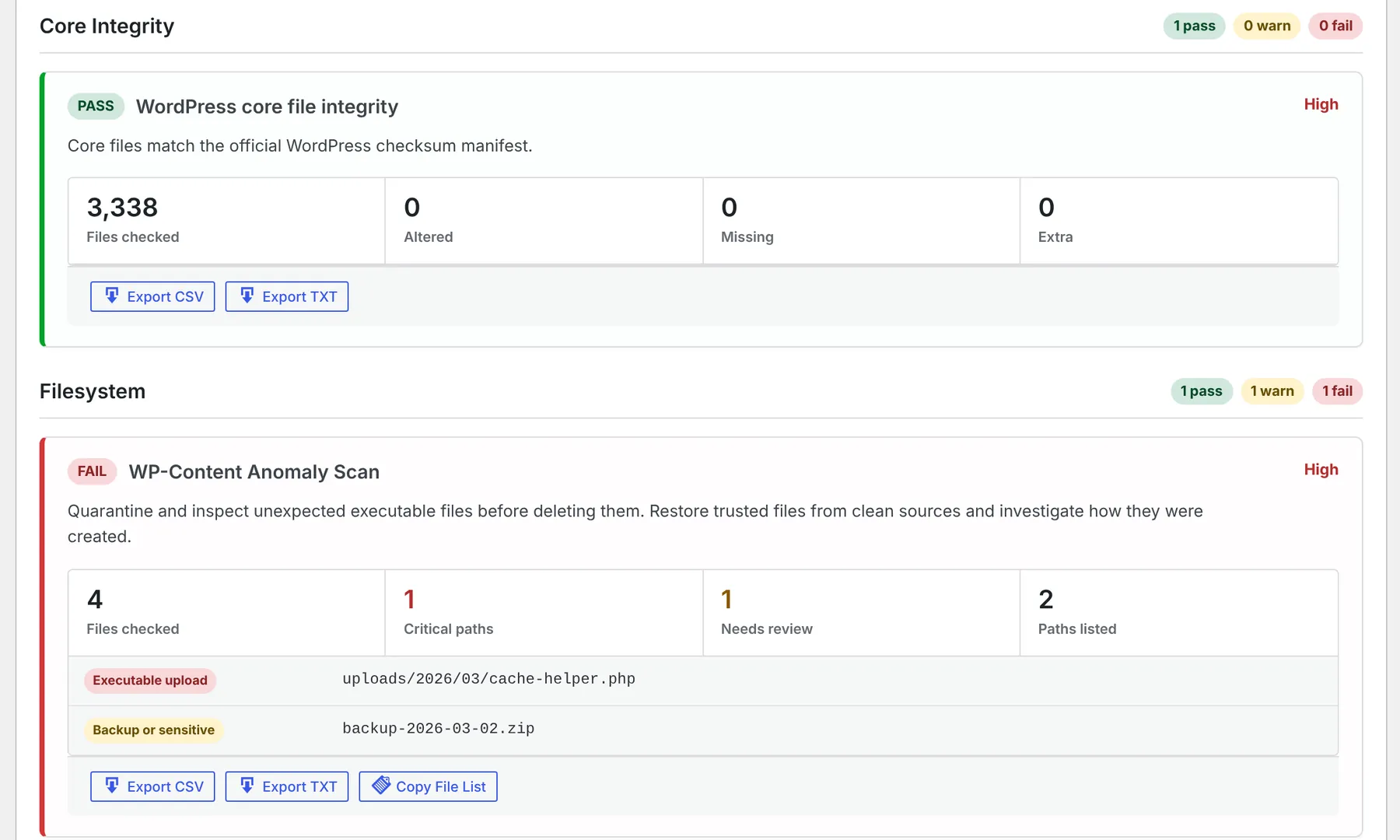
Filesystem
3 checkswp-content anomaly scan high
A bounded walk through wp-content that looks where web shells and leaked archives actually live: executable files in uploads, unexpected PHP in the wp-content root and cache or upgrade folders, runtime executables, and backup or secret-like files (archives, SQL dumps, .env, logs). Plugin, theme, mu-plugin and language folders are excluded on purpose, because they legitimately contain PHP; their risk is covered by the update and vulnerability checks.
It checks up to 25,000 files and lists up to 500 paths, with CSV/TXT export. Developers can tune it with seven filters: lockora_wp_content_allowed_files, lockora_wp_content_excluded_paths, lockora_wp_content_executable_extensions, lockora_wp_content_sensitive_extensions, lockora_wp_content_archive_extensions, lockora_wp_content_scan_max_files and lockora_wp_content_max_reported_paths.
It is not a signature-based malware scanner. What to do if you find PHP in uploads.
wp-config.php writability medium
Warns when the web server can write to wp-config.php. A writable config lets any code-execution bug rewrite your database credentials and salts. File permissions guide.
MU plugins directory info
Reports whether wp-content/mu-plugins exists and how many PHP files it holds. Must-use plugins load automatically and never appear in the normal plugin list, so they are worth reviewing by hand.
Configuration
7 checksWordPress authentication salts high
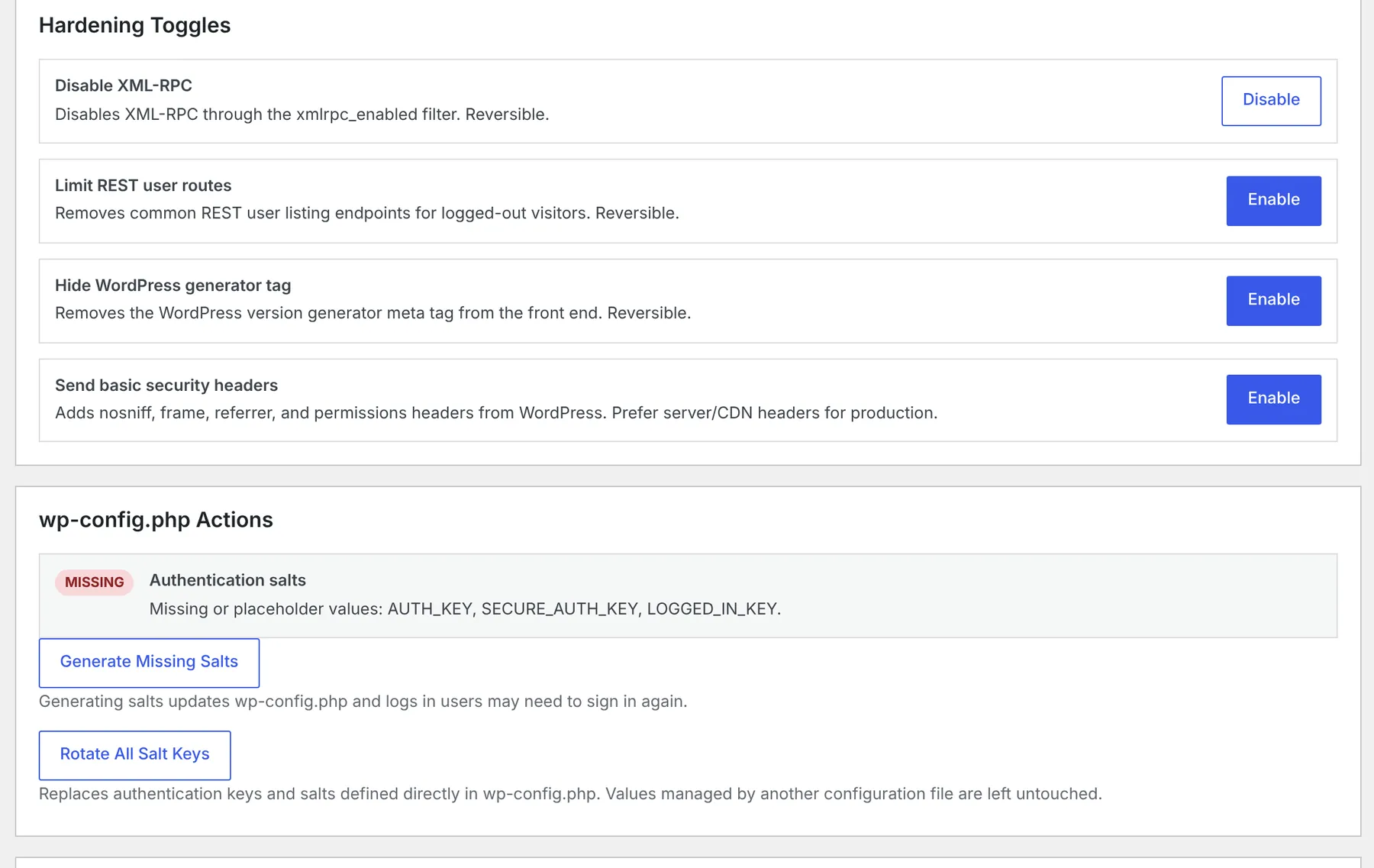
Checks all eight keys and salts at runtime and fails on any that are missing or still hold a placeholder such as put your unique phrase here. If they are defined in a writable wp-config.php, two explicit actions appear: Generate Missing Salts and Rotate All Salt Keys. Writes are verified and rolled back if the file does not match; salts defined elsewhere (for example in a Bedrock .env) are checked but never rewritten. Why salts matter.
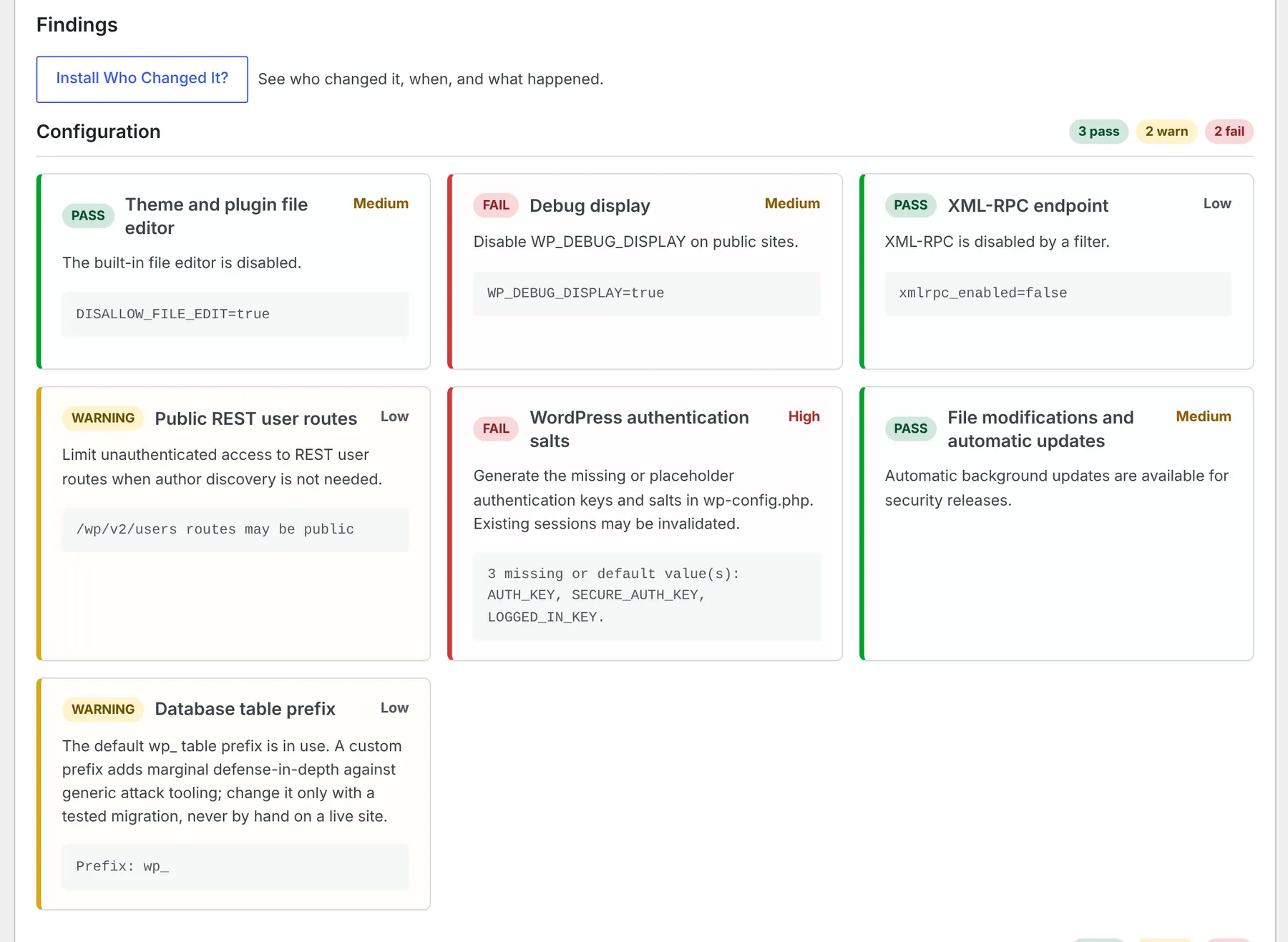
Theme and plugin file editor medium
Fails unless DISALLOW_FILE_EDIT is true. The built-in editor turns a stolen admin session into code execution in one click.
Debug display medium
Fails when PHP errors can be shown to visitors (WP_DEBUG_DISPLAY). Error output leaks paths, versions and sometimes queries.
XML-RPC endpoint low
Warns while the xmlrpc_enabled filter is on. A reversible toggle turns it off. Should you disable xmlrpc.php?
Public REST user routes low
Warns while /wp/v2/users is open to logged-out visitors, which lists usernames. A reversible toggle closes it for visitors only.
File modifications and automatic updates medium
Warns if AUTOMATIC_UPDATER_DISABLED or WP_AUTO_UPDATE_CORE = false blocks security releases, and notes when DISALLOW_FILE_MODS means updates must come from your deployment process.
Database table prefix low
Notes the default wp_ prefix. It is marginal defence in depth, and the plugin says so: change it only with a tested migration.
Access control
7 checksDefault admin username high
Flags any Administrator whose login is admin, the first username every brute-force tool tries.
Excessive administrator accounts medium
Warns when there are more than two Administrators. Every extra admin is another password that can unlock everything.
Inactive administrator users medium
Flags admins with no recorded login in 90 days. The plugin records last-login times from activation onwards, so it avoids the false positives of session-based checks.
Administrator account inventory info
Lists every Administrator’s username and email in one place, so the review starts from a list rather than a spreadsheet.
User ID 1 exposure medium
Warns when user ID 1 is an Administrator and has published posts, which makes the most privileged account trivially discoverable.
Application passwords low
Warns when application passwords are available, so you can confirm an integration actually needs them and review active passwords per user.
Login protection and two-factor authentication low
Detects whether a known login-protection or two-factor plugin is installed. It does not inspect each user’s 2FA enrolment. Securing the login page.
The full Administrator review process is in the user roles and permissions guide.
Public exposure
5 checksThese checks request your own site’s public URL (loopback requests) to see what an outsider sees. Nothing is sent to a third party.
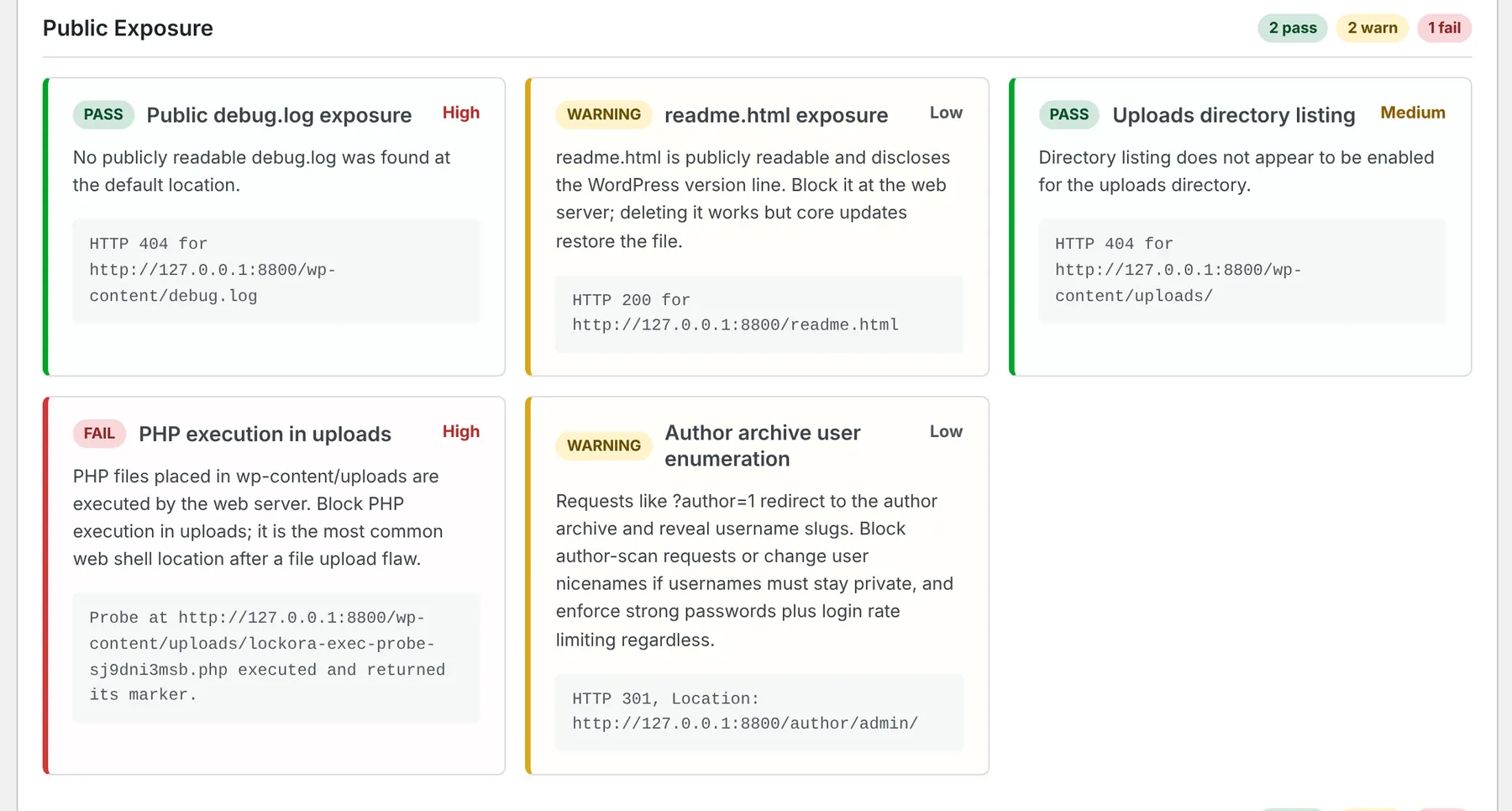
readme.html.Public debug.log exposure high
Requests wp-content/debug.log. A readable log leaks paths, plugin names, and sometimes credentials or personal data.
PHP execution in uploads high
Writes a tiny probe file to uploads, requests it and deletes it. If the probe runs, any file-upload flaw becomes remote code execution. It is the most common web-shell location.
Uploads directory listing medium
Checks whether wp-content/uploads/ returns a browsable index of every file you have uploaded.
readme.html exposure low
Checks whether readme.html is readable. Block it at the web server; deleting it works until the next core update restores it.
Author archive user enumeration low
Requests ?author=1 and checks whether the redirect reveals a username slug.
Transport and headers
3 checksHTTPS site URL high
Fails if the site address is not HTTPS.
SSL certificate expiry medium
Opens a TLS connection to your own hostname and reads the expiry date: a warning within 30 days, a high-severity warning within 14, a failure once expired.
HTTP security headers medium
Reads the homepage response (HEAD, falling back to GET) and lists what is missing: Strict-Transport-Security on HTTPS sites, X-Content-Type-Options: nosniff, X-Frame-Options or a CSP frame-ancestors, Referrer-Policy, Permissions-Policy and Content-Security-Policy. Headers added by a CDN in front of the site may not be visible from the server. A toggle can send the basic set from WordPress.
Vulnerability posture
6 checksWordPress core update posture high
Reports whether a core update is available.
Plugin update posture high
Counts plugins with an update waiting. Most mass compromises exploit plugins that already had a patch.
Theme update posture medium
Counts themes with an update waiting.
Known vulnerability feed medium
With a Wordfence Intelligence API key, matches installed core, plugin and theme versions against known vulnerabilities, locally. Without one, this check reminds you that no feed is connected. Other sources can plug in through the lockora_vulnerability_findings filter.
Inactive plugins low
Inactive plugins are still on disk and still exploitable if their files are reachable. Delete what you do not need.
Inactive themes low
Keep the active theme and one default fallback (it follows WP_DEFAULT_THEME); delete the rest.
Runtime and AI
2 checksPHP runtime version medium
Compares your PHP version with the minimum and recommended versions from WordPress.org’s Serve Happy API, and whether it still receives security updates.
WordPress AI Client info
Reports whether the optional AI client report is available (WordPress 7.0+ with a configured AI Connector). Every other check works without it.
Reversible hardening toggles and actions
Four low-risk settings you switch on from the plugin and off again at any time. Nothing is applied automatically.
| Toggle | What it does |
|---|---|
| Disable XML-RPC | Sets the xmlrpc_enabled filter to false. |
| Limit REST user routes | Removes /wp/v2/users endpoints for logged-out visitors only. |
| Hide WordPress generator tag | Removes the version meta tag from the front end. |
| Send basic security headers | Adds nosniff, X-Frame-Options, Referrer-Policy, Permissions-Policy and HSTS on HTTPS. Server or CDN headers are better for production. |
Score, history, exports and integrations
- Weighted score out of 100 with four labels: Good (85+), Fair (70–84), Needs hardening attention (50–69), Critical remediation recommended (under 50).
- Scan comparison and history: new, resolved, changed and unchanged findings against the previous scan; up to 20 scans kept.
- Exports: CSV and TXT for core integrity and the
wp-contentanomaly scan; the full report as JSON, CSV or YAML from WP-CLI. - Site Health: the score plus five configuration checks appear under Tools → Site Health → Status. How it works.
- WP-CLI:
wp lockora scanandwp lockora reportwith--format=jsonand--strictfor CI. WP-CLI docs. - Developer hook:
lockora_scan_completedfires after every scan with the report and the previous report. - AI client report (optional, WordPress 7.0+): a client-ready summary written from sanitized findings by the AI provider you connect. For agencies.
- Who Changed It? integration: if the companion activity-log plugin is active, findings link to the activity that caused them.
What Lockora does not do
- It is not a firewall and does not block traffic. Pair it with one.
- It is not a signature-based malware scanner; the anomaly scan looks at file locations and types, not file contents.
- It does not run scheduled scans or send alerts yet; schedule
wp lockora scanwith cron or CI. - It does not apply fixes automatically. Only the four toggles and the salt actions change anything, and only when you click them.
- It does not ship a vulnerability database; known-CVE matching needs your Wordfence Intelligence key.
- It does not send file contents, passwords, salts, API keys, logs or user lists off your site.
Comparing options? Eight WordPress security audit plugins, compared honestly.
Run all 34 checks on your site
Free on WordPress.org. Install, open Tools → Lockora Security Audit, click Run Scan.